
Kindle eBook Marketing Cover Image: Size and Requirements
 Proselis TeamPosted on August 4, 2026
A Kindle eBook marketing cover image is the front-cover image uploaded separately from the eBook file. Amazon uses it to represent the book on its product detail page.
This article covers only the marketing cover image. It does not cover the image embedded inside the eBook or print covers for paperback and hardcover books.
Kindle eBook marketing cover specifications
| Specification | Amazon KDP guidance |
|---|---|
| Recommended dimensions | 1,600 pixels wide × 2,560 pixels high |
| Aspect ratio | 1:1.6 |
| Resolution | At least 300 PPI |
| Preferred format | JPEG |
| Color profile | RGB |
| Maximum file size | 5 MB |
Recommended dimensions versus minimum size
The dimensions, as shown below, are Amazon's recommendation, not the minimum size KDP will accept.
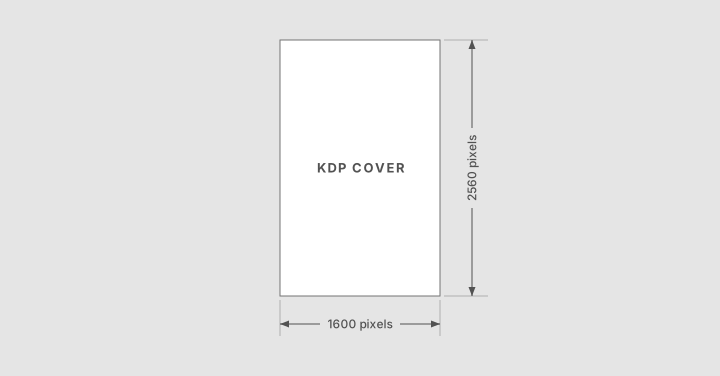
You may be able to upload a smaller marketing cover, but KDP can display a reminder when an image is below the recommended size. A cover with fewer than 500 pixels on its shortest side will not be displayed on Amazon's website.
Create the cover at the recommended dimensions whenever possible. Do not enlarge a small image simply to meet the recommendation, because upscaling can make the artwork and text look blurry or pixelated.
What does an RGB color profile mean?
RGB stands for red, green, and blue. It is the color system used for images displayed on phones, tablets, computers, and Kindle devices.
For broad compatibility, export the cover using the sRGB profile, which is a standard type of RGB profile used for digital images.
Do not submit the marketing cover in CMYK. CMYK is intended primarily for printed materials and is not supported for Kindle cover images. If you are adapting an existing print cover, convert it from CMYK to RGB before exporting the JPEG.
Marketing cover design requirements
The marketing cover should include the book title and author or contributor name. These details should match the information entered on the book's Amazon detail page, including spelling and language.
All text should remain clear when the cover is displayed at a small size. Check that it is not blurry, cropped, or difficult to distinguish from the background.
The image should contain only the front-cover design. Do not include print-cover elements such as:
- A spine
- A back cover
- A barcode
- An inside flap
The cover must not mention a price or temporary promotion. It should also be free of watermarks, placeholder text, and artwork used without the copyright holder's permission.
Alignment and light-colored covers
Keep the cover design centered horizontally and vertically, and preserve its proportions when resizing it. Stretching or compressing the image can distort the artwork and typography.
If the cover has a white or very light background, add a narrow 3–4 pixel medium-gray border. This defines the edges of the cover against the white background of an Amazon page.
Once the image is ready, inspect the exported JPEG at both full size and thumbnail size. This will help you catch blurred text, compression problems, poor contrast, or cropped elements before uploading it to KDP.